
Why Knowing How to Choose the Right Smart Thermostat Can Transform Your Home’s Comfort
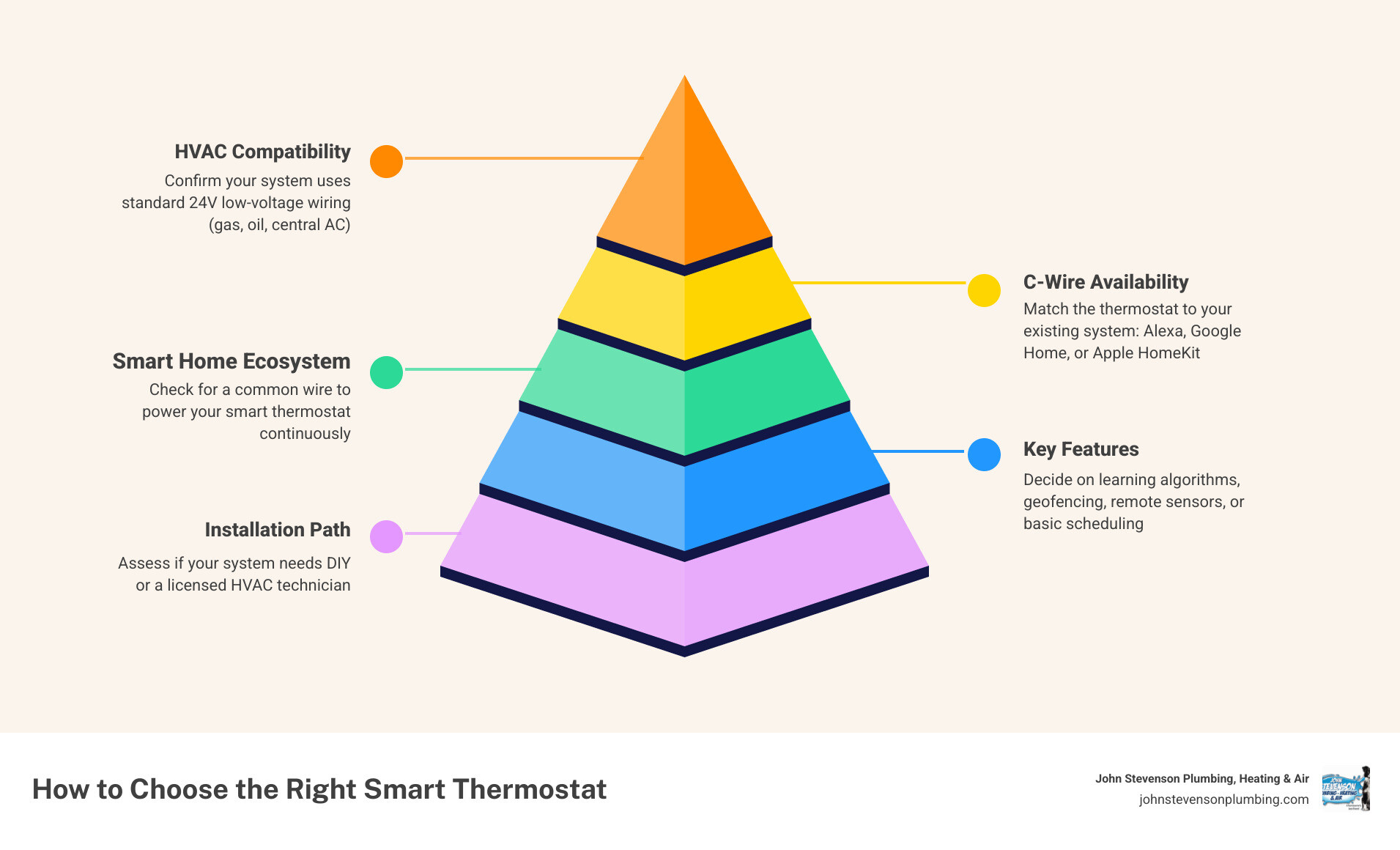
How to choose the right smart thermostat comes down to five key factors most homeowners overlook until they’re standing in the hardware store aisle, confused:
- HVAC compatibility – Confirm your system uses standard 24V low-voltage wiring (most gas, oil, and central AC systems do)
- C-wire availability – Check whether your existing wiring includes a common wire for continuous power
- Smart home ecosystem – Match the thermostat to Alexa, Google Home, or Apple HomeKit, whichever you already use
- Key features – Decide if you need learning algorithms, geofencing, remote room sensors, or basic scheduling
- Installation path – Determine whether your system is simple enough for DIY or needs a licensed HVAC technician
Only 13% of U.S. homes currently have a smart thermostat installed — yet the average American household spends more than $900 a year on heating and cooling. That gap represents a real opportunity for homeowners in Carlsbad, CA, where year-round mild temperatures mean your HVAC system runs more often than you might think, quietly draining your energy budget in the background.
The good news: a well-matched smart thermostat can reduce your heating and cooling costs by 10–23%, according to EPA studies. The catch is that “well-matched” is doing a lot of heavy lifting in that sentence. The wrong model — one that’s incompatible with your wiring, your HVAC system type, or your daily schedule — can underperform, cause system glitches, or even damage HVAC components.
This guide walks you through every decision point so you can choose with confidence.
Understanding Your HVAC System and Wiring Compatibility
Before you fall in love with a sleek, high-tech touchscreen display, you need to look at what is hiding inside your walls. The single most common mistake homeowners make is buying a thermostat based purely on its appearance or rating, only to find out it is completely incompatible with their home’s heating and cooling equipment.
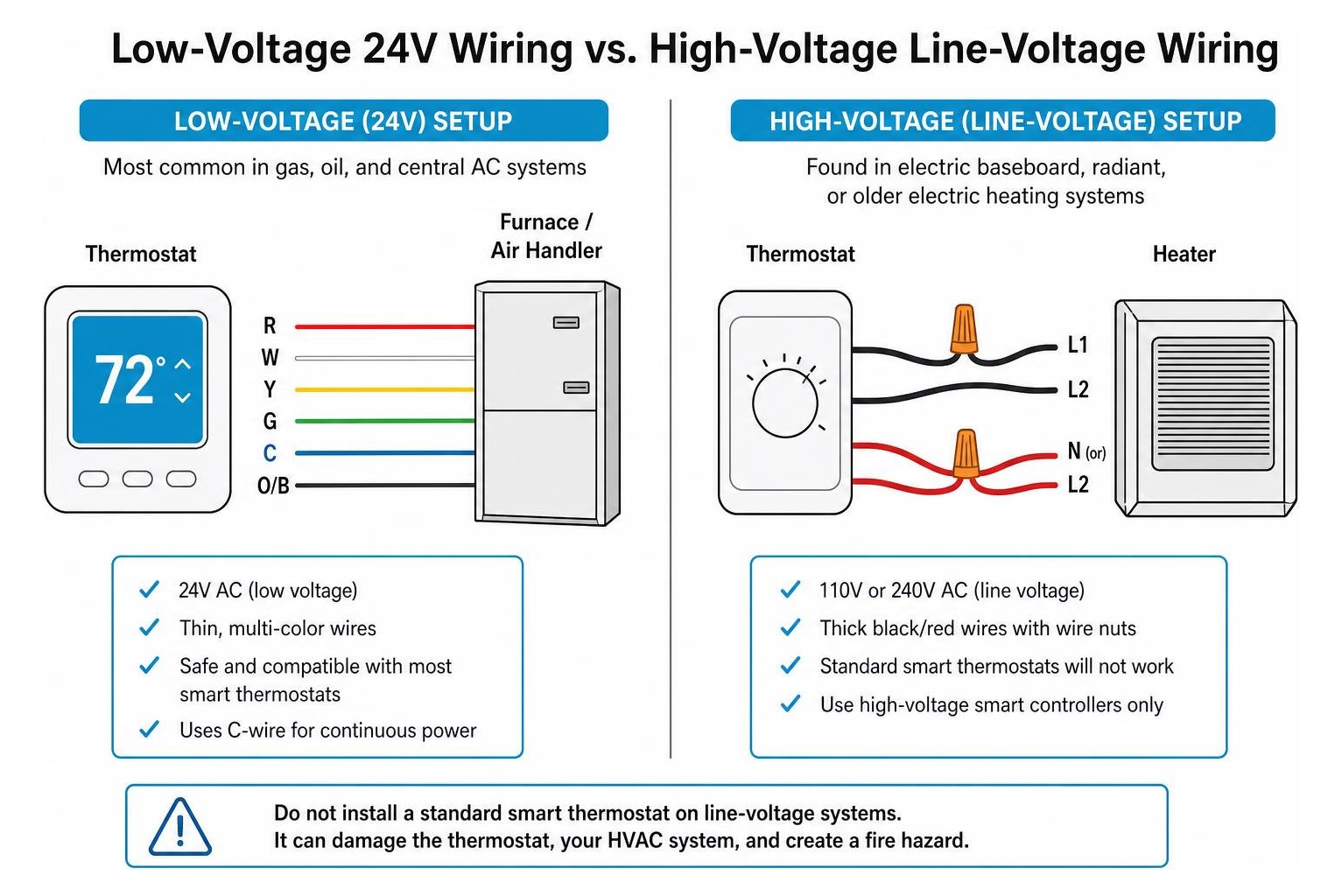
Most residential HVAC systems in Carlsbad and surrounding Southern California communities fall into one of three electrical categories:
- Low-Voltage Systems (24V): This is the standard for the vast majority of central gas furnaces, electric heat pumps, and central air conditioning systems. If your current thermostat is wired with thin, colorful wires (similar to doorbell wiring), you have a 24V system. Almost all mainstream smart thermostats are designed specifically for this type of system.
- Line-Voltage Systems (110V or 240V): These systems feature thick black or red wires joined by wire nuts. They are typically found in homes with electric baseboard heaters, radiant in-wall heaters, or older electric floor furnaces. Standard smart thermostats will not work with line-voltage systems and can actually present a serious fire hazard if connected to them. If you have line-voltage heating, you must look for specialized high-voltage smart controllers.
- Proprietary Communicating Systems: Some high-efficiency, variable-speed, or multi-stage HVAC systems use proprietary communicating protocols rather than standard R/W switched signals. These systems often require specific, manufacturer-branded smart thermostats to properly control the variable speeds and staging. If you hook up a generic retail smart thermostat to a communicating system, you may lose the high-efficiency benefits of your variable-speed equipment.
Additionally, heat pump systems require a thermostat that explicitly supports auxiliary or emergency heating stages. If your thermostat cannot distinguish between the highly efficient heat pump mode and the expensive auxiliary electric heat strips, it may trigger the backup heat unnecessarily, causing your utility bills to skyrocket.
Understanding how your thermostat interacts with your heating and cooling setup is just one piece of the puzzle. To keep your entire system running reliably year-round, check out our guide on Everything You Need To Know About Annual Hvac Maintenance.
The Crucial C-Wire and How to Choose the Right Smart Thermostat Without One
Once you have confirmed that you have a standard 24V low-voltage system, your next step is to look for the “C-wire” (Common wire).
An old-school manual thermostat only needs a tiny amount of electricity, which it can easily pull from a couple of AA batteries. A modern smart thermostat, however, is essentially a mini-computer. It has a bright color touchscreen, a constant Wi-Fi connection, and background processors running automation algorithms. To power all of this, it requires a continuous, stable flow of 24V electricity supplied directly from your furnace or air handler’s transformer. This continuous power is delivered through the C-wire.
To check if you have a C-wire:
- Turn off the power to your HVAC system at your main circuit breaker box.
- Pop the faceplate off your current thermostat.
- Look at the terminal block where the wires connect.
- Check if there is a wire connected to the terminal labeled “C”.
Sometimes, you might find an unused wire tucked back inside the drywall. If you see an extra wire that is not connected to anything, it may already be hooked up to the C-terminal on your furnace’s control board.
What if you do not have a C-wire? You have four main options:
- Use a Power Extender Kit (PEK) / C-Wire Adapter: Many premium smart thermostats come packaged with a small adapter kit. This device is installed inside your furnace or air handler cabinet. It combines the signals of your existing wires (typically a 4-wire setup) to share power and control without requiring you to run a brand-new wire through your walls.
- Choose a “Power-Stealing” Thermostat: Some smart thermostats are marketed to work without a C-wire by using a method called “power stealing” or “power robbing.” When your heating or cooling is running, the thermostat trickles a small amount of power to charge its internal battery. However, many HVAC professionals caution against using power-stealing models without a C-wire. On older or sensitive systems, this power-stealing behavior can cause the system to “chatter,” short-cycle, or even damage your furnace’s control board.
- Battery-Powered Models: A few basic smart models can run on standard replaceable batteries, but they often restrict how often they connect to Wi-Fi to preserve battery life, limiting your real-time control.
- Professional Wiring Solutions: The most robust and reliable option is to have a licensed technician run a dedicated C-wire from your HVAC system to your thermostat location. This completely eliminates power dropouts, connectivity issues, and system wear-and-tear.
Key Features to Evaluate When Deciding How to Choose the Right Smart Thermostat

Once compatibility is sorted out, you can focus on the features that will make your daily life easier. The ultimate goal when researching how to choose the right smart thermostat is to find a model that fits seamlessly into your routine without requiring constant manual adjustments.
Here are the features that actually make a difference in your comfort and utility savings:
- Geofencing (Auto-Away): This feature uses your smartphone’s location services to establish a virtual boundary around your home. When you cross the boundary on your way to work, the thermostat automatically shifts into energy-saving “Away” mode. When you head back home, it detects your approach and starts conditioning the air so it is perfectly comfortable the moment you walk through the door. This is a game-changer for households with irregular schedules.
- Remote Room Sensors: Thermostats are usually installed in central hallways, which are rarely the rooms where you actually spend your time. This can lead to a multi-story home having a significant temperature imbalance — such as a warm upstairs bedroom and a cold downstairs living room. Remote wireless sensors can be placed in active rooms to measure temperature and occupancy, allowing the thermostat to balance the climate based on where you are actually sitting.
- Smart Home Ecosystem Integration: If you are already building a smart home, you want your new thermostat to communicate with your existing devices. If you rely on Amazon Alexa, look for models with deep Alexa integration. If you are an Apple user, ensure the device supports Apple HomeKit. For Google Home users, a Nest device is often the most natural fit.
- The Matter Protocol: If you want to future-proof your purchase, look for a thermostat that supports the Matter protocol. Matter is a unifying smart home standard that allows devices from different manufacturers to work together locally without relying on complex cloud integrations.
- Network Security and VLANs: Because smart thermostats connect to your home Wi-Fi network, they can occasionally be targets for firmware exploits. A recommended best practice is to place your smart thermostat on a dedicated guest network or an IoT (Internet of Things) VLAN to keep your personal computers and financial data secure.
To see how these smart features can be put to work during our warmest Southern California months, read our expert recommendations on How To Save Energy With Best Thermostat Settings For Summer.
Learning vs. Programmable Models: How to Choose the Right Smart Thermostat for Your Routine
As you compare smart thermostats, you will notice they generally fall into two categories of intelligence: Learning and Programmable.
Learning Thermostats use built-in motion sensors and algorithms to monitor your daily habits. For the first week or two, you simply adjust the temperature manually whenever you feel warm or chilly. The thermostat remembers these adjustments, notes what time of day you made them, and builds a personalized schedule in the background. If you consistently turn the heat down before bed, the learning thermostat will eventually start doing it for you.
However, learning algorithms are not always a perfect match for everyone. If your household schedule is highly irregular — or if you have kids who constantly fiddle with the dial — the learning algorithm can become confused, leading to frustrating temperature swings.
Programmable Smart Thermostats, on the other hand, do not try to guess your behavior. Instead, they give you a highly flexible digital calendar (usually via a smartphone app) where you can easily program 7-day, 5-2 day, or daily schedules. This is often the ideal choice for people who prefer total control over their settings or have highly predictable routines.
Both types of smart thermostats often feature Adaptive Recovery. This feature learns exactly how long your specific HVAC system takes to heat or cool your home. If you program your thermostat to be 72°F at 7:00 AM, adaptive recovery calculates the outdoor climate and your home’s thermal baseline to start the system early, ensuring your home hits that target temperature exactly at 7:00 AM.
For a deeper dive into setting up these schedules to maximize your utility savings, check out our guide on How To Skyrocket Your Energy Savings With Best Thermostat Settings.
Maximizing Your Energy Savings and ROI
Upgrading your thermostat is one of the highest-ROI improvements you can make for your home. While a high-end thermostat represents an upfront investment, it typically pays for itself within one to two years through reduced utility bills.
According to Energy Star, a certified smart thermostat can shave about 8 percent off your home’s heating and cooling bills, which translates to an average savings of $50 a year. For larger homes or households with higher heating and cooling demands, the EPA estimates total savings can reach 10% to 23%, or up to $100 to $200 annually.
To get the absolute most out of your investment, keep these strategies in mind:
- Look for the Energy Star Label: Energy Star certified smart thermostats are independently verified using actual field data to ensure they deliver real-world savings. They are also required to feature an ultra-low-power standby mode when inactive.
- Leverage Geofencing and Setbacks: Every single degree of temperature adjustment you make for an eight-hour period can change your home’s energy usage by 6% to 8%. By programming a setback of 7 to 10 degrees while you are asleep or at work, you can easily secure double-digit percentage savings on your monthly bill.
- Participate in Demand-Response Programs: Many local utility companies in Southern California offer financial incentives, bill credits, or rebates if you enroll your smart thermostat in their demand-response programs. During peak demand conditions on hot summer afternoons, the utility company may temporarily adjust your thermostat by a degree or two to prevent grid overloads.
Managing your energy use during peak demand is especially critical in our local coastal and inland climates. To learn more about navigating these high-demand periods, read our guide on Peak Performance How To Save On Electricity During Peak Summer.
Additionally, you do not have to shoulder the entire cost of upgrading your home’s efficiency alone. There are several local and state incentives designed to help. Learn how to take advantage of these programs by reading about Dont Sweat The Cost With These California Hvac And Water Heater Rebates.
Frequently Asked Questions About Smart Thermostats
Should I choose a DIY installation or hire a professional?
While many manufacturers design their retail smart thermostats for quick, 30-minute DIY installations, there are several real risks involved if you are not comfortable working with low-voltage electrical wiring:
- System Damage: Accidentally touching the wrong two wires together can cause a short circuit that immediately blows the low-voltage fuse on your furnace’s control board. In worse cases, it can permanently fry the entire control board, resulting in a costly repair bill.
- Incompatibility Issues: If you have a multi-stage heat pump, a dual-fuel system, or a zoning system with dampers, the wiring can become incredibly complex. Miswiring these systems can lead to your heating and cooling running at the same time, or your expensive backup heat running constantly.
- Warranty Protection: Some manufacturers only offer their maximum warranty period (which can be up to 10 years for certain brand-certified models) if the unit is installed by a licensed professional.
If your home lacks a C-wire, has a complex multi-zone setup, or uses specialized variable-speed equipment, hiring a Carlsbad HVAC expert ensures your new thermostat is configured correctly from day one without risking your existing system’s health.
What happens to my smart thermostat during a power outage or Wi-Fi drop?
If your home experiences a power outage, your smart thermostat will go dark along with your other appliances. However, quality smart thermostats feature internal battery backups or non-volatile memory. This means all of your programmed schedules, Wi-Fi credentials, and system settings are safely saved. Once power is restored, the thermostat will automatically reboot, reconnect to your Wi-Fi network, and resume its normal schedule.
If you only lose your Wi-Fi connection but keep electrical power, your smart thermostat will continue to function as a traditional programmable thermostat. It will follow its locally stored schedule and allow you to make manual adjustments on the wall screen. However, you will temporarily lose remote app control, geofencing, and real-time weather updates until the Wi-Fi connection is restored.
Can a smart thermostat control a ductless mini-split or baseboard heater?
Standard low-voltage smart thermostats cannot directly control ductless mini-splits or electric baseboard heaters because these systems do not use standard 24V thermostat wiring.
However, you can still enjoy smart automation for these systems:
- For Ductless Mini-Splits: You can install a specialized “Smart AC Controller.” These devices act like Wi-Fi-connected universal remotes. They mount on the wall near your mini-split indoor head and send automated infrared (IR) commands to the unit, allowing you to control temperature, fan speed, and schedules from a smartphone app.
- For Electric Baseboard Heaters: You must purchase a high-voltage (line-voltage) smart thermostat specifically designed for 110V or 240V electrical systems. These specialized controllers are built to safely handle the high electrical current required by electric resistance heating.
Conclusion
Finding how to choose the right smart thermostat is one of the smartest, highest-impact upgrades you can make for your home’s comfort and your family’s budget. By taking the time to verify your HVAC system’s voltage, checking your wall for a C-wire, and selecting features that match your actual daily routine, you can enjoy a more comfortable home while watching your monthly energy bills shrink.
At John Stevenson Plumbing, Heating & Air Conditioning, Inc., we have spent years helping Carlsbad, San Diego County, and Orange County homeowners optimize their indoor comfort. Whether you need a comprehensive system diagnostic or want to ensure your new smart thermostat is wired perfectly to protect your HVAC equipment, our team is here to help. Every service we perform is backed by our 5-Star Service Guarantee — featuring thorough diagnostics, upfront pricing, certified technicians, and a 24-hour satisfaction check-in.
Ready to make your home more efficient and connected? Contact us today to schedule our professional energy-efficient thermostat installation services and start saving energy the smart way!